Decorators
Functions can also be passed as arguments to other functions, and the results of other functions can be returned. For example, it is possible to write a Python function that takes another function as a parameter, embeds it within another function that does something similar, and then returns the new function. This new combination can then be used in place of the original function:
 1>>> def inf(func):
 2...     print("Information about", func.__name__)
 3...     def details(*args):
 4...         print("Execute function", func.__name__, "with the argument(s)")
 5...         return func(*args)
 6...     return details
 7...
 8>>> def my_func(*params):
 9...     print(params)
10...
11>>> my_func = inf(my_func)
12Information about my_func
13>>> my_func("Hello", "Pythonistas!")
14Execute function my_func with the argument(s)
15('Hello', 'Pythonistas!')
- Line 1
The
inffunction prints the name of the function it wraps.- Line 12
When it has finished, the
inffunction returns the wrapped function.
A decorator is syntactic sugar for this process and allows you to wrap one function around another with a single line of code. You still get exactly the same effect as with the previous code, but the resulting code is much cleaner and easier to read. Using a decorator simply consists of two parts:
defining the function that is to wrap or decorate other functions, and
using an
@, followed by the decorator, immediately before the wrapped function is defined.
The decorator function should take a function as a parameter and return a function, as follows:
1>>> @inf
2... def my_func(*params):
3...     print(params)
4...
5Information about my_func
6>>> my_func("Hello", "Pythonistas!")
7Execute function my_func with the argument(s)
8('Hello', 'Pythonistas!')
- Line 1
The function
my_funcis decorated with@inf.- Line 8
The wrapped function is called once the decorator function has finished.
functools
The Python functools module is designed for higher-order functions, that
are functions which act on or return other functions. You can usually use them
as decorators, for example:
functools.cache()A simple, lightweight cache for functions in Python 3.9 and later, sometimes also referred to as memoize. It returns the same result as
functools.lru_cache()with the parametermaxsize=None, whilst additionally creating a Dictionaries containing the function arguments. As old values never need to be deleted, this function is therefore smaller and faster. An example:1>>> from timeit import timeit 2>>> from functools import cache 3>>> @cache 4... def factorial(n): 5... return n * factorial(n - 1) if n else 1 6... 7>>> timeit("factorial(10)", number=1, globals=globals()) 88.74977558851242e-06 9>>> timeit("factorial(12)", number=1, globals=globals()) 104.041939973831177e-06 11>>> timeit("factorial(12)", number=1, globals=globals()) 121.8328428268432617e-06
- Line 1
imports the
timeitmodule to measure execution time.- Line 2
imports
functools.cache().- Line 3
The
@cachedecorator is used to store intermediate results, which can then be reused. In our case, this increases the execution speed by a factor of approximately ten.- Line 7
timeit.timeit()measures the time taken for a call.- Line 9
Only two further recursive calls need to be made, as
factorial(10)is already cached.
functools.singledispatch()converts a function into a generic function. To define a generic function, it is decorated with the
@singledispatchdecorator:>>> from functools import singledispatch >>> >>> @singledispatch ... def multiply(a, b): ... raise NotImplementedError("Unsupported type") ...
To add overloaded implementations to the function, you can use
register()on the generic function as a decorator:>>> @multiply.register(float) ... def _(a, b): ... print(a * b) ... >>> @multiply.register(str) ... def _(a, b): ... print(float(a) * float(b)) ... >>> multiply(7.0, 0.6) 4.2 >>> multiply("7.0", "0.6") 4.2
For functions annotated with types, the decorator automatically infers the type of the first argument.
functools.wraps()This decorator ensures that the wrapped function looks exactly like the original function, with its name and attributes intact.
>>> from functools import wraps
>>> def my_decorator(f):
...     @wraps(f)
...     def wrapper(*args, **kwargs):
...         """Wrapper docstring"""
...         print("Call decorated function")
...         return f(*args, **kwargs)
...     return wrapper
...
>>> @my_decorator
... def example():
...     """Example docstring"""
...     print("Call example function")
...
>>> example.__name__
'example'
>>> example.__doc__
'Example docstring'
Without the
@wrapsdecorator, the name and docstring of thewrappermethod would have been returned instead:>>> example.__name__ 'wrapper' >>> example.__doc__ 'Wrapper docstring'
Other typical uses for Python decorators
Other Python compilers
Python compilers such as Numba can be used with a decorator:
@numba.jit(nopython=True)
def dist(x, y):
    """Calculate the distance"""
    dist = 0
    for i in range(len(x)):
        dist += (x[i] - y[i]) ** 2
    return dist
See also
Parallelisation
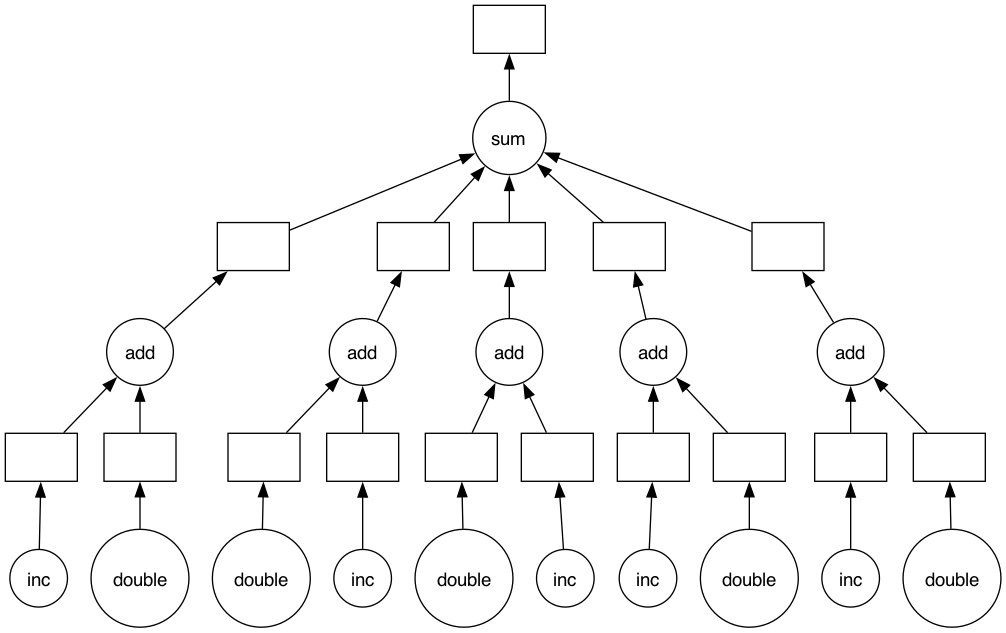
The sequential execution of independent pipeline steps does not make optimal use of the processing power of processors. The @dask.delayed decorator creates a directed acyclic graph (DAG) to execute the tasks in parallel, which helps to reduce the overall execution time:
>>> import dask
>>> @dask.delayed
... def inc(x):
...     return x + 1
...
>>> @dask.delayed
... def double(x):
...     return x * 2
...
>>> @dask.delayed
... def add(x, y):
...     return x + y
...
>>> data = range(1, 6)
>>> output = []
>>> for x in data:
...     a = inc(x)
...     b = double(x)
...     c = add(a, b)
...     output.append(c)
...
>>> total = dask.delayed(sum)(output)
>>> total.compute()
50
>>> total.visualize()
<IPython.core.display.Image object>
Memory profiling
The @memory_profiler.profile decorator is used to measure memory usage. It
monitors the enclosed function step by step, tracking RAM usage or the amount of
memory released at each individual step:
1from memory_profiler import profile
2
3
4@profile
5def my_func():
6    a = [1] * (10**6)
7    b = [2] * (2 * 10**7)
8    del b
9    return a
The output might look like this:
Line #    Mem usage    Increment   Line Contents
================================================
     4     67.3 MiB     67.3 MiB   @profile
     5                             def my_func():
     6     74.8 MiB      7.5 MiB       a = [1] * (10 ** 6)
     7    227.4 MiB    152.6 MiB       b = [2] * (2 * 10 ** 7)
     8     74.9 MiB      0.0 MiB       del b
     9     74.9 MiB      0.0 MiB       return a
See also